
Prisma Calendar
Turn any note with a date into a flexible planning system inside Obsidian.
 Install in Obsidian — one click
 Opens the official page — click Add to Obsidian to install, or see the install guide .
Prisma Calendar in Action
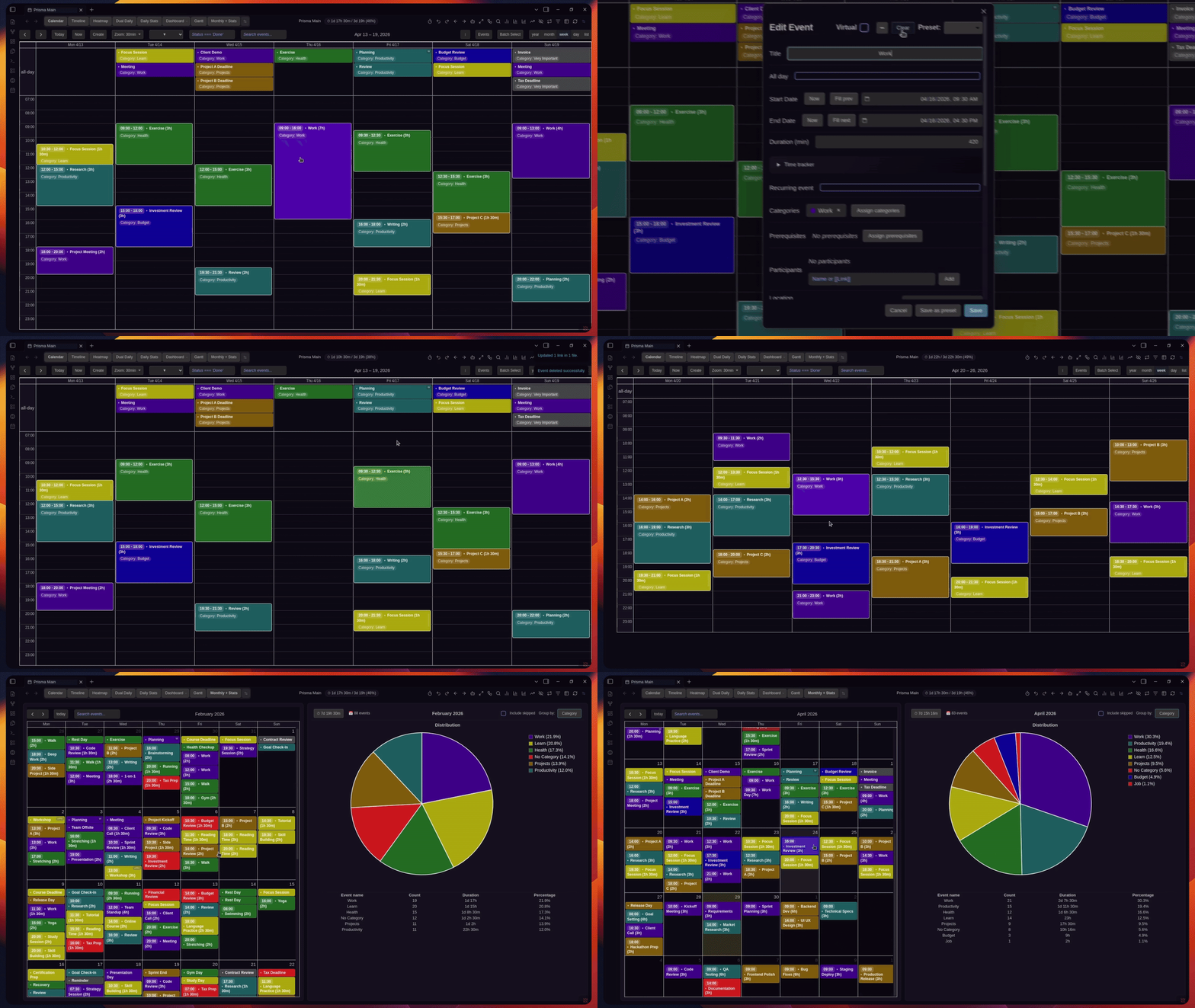
Weekly view showcasing timed and all day events with custom coloring.
There are no rigid schemas or predefined structures — just your data, your rules, fully under your control. Prisma lets you see your entire vault through time.
Prisma adapts to you, not the other way around. You give it properties, it visualizes them. Keep your existing systems and workflows — Prisma doesn't enforce anything. It can complement any system because it works everywhere, with everything.
Whether you're planning projects, tracking deadlines, managing recurring habits, or building a full personal operating system inside Obsidian — Prisma gives you the infrastructure to do it your way.
Get started in minutes
This video walks you through the core workflow: installing the plugin, connecting your notes, configuring properties, and turning your vault into a flexible planning system. Install it in one click from the Obsidian Community Plugin Store, configure your date property, and you're creating events immediately. No setup wizard. No onboarding flow. Just open and go.
What can you do with Prisma?
Calendar for your notes
Turn Markdown notes with a date into draggable events in month, week, day, list, and timeline views.
Plan projects & deadlines
Map project notes into timelines, milestones, dependencies, and Gantt-style plans.
Recurring notes & habits
Daily, weekly, monthly, or custom recurring notes — track patterns with a heatmap and stats on streaks, skips, and intervals.
Meetings with context
Schedule meetings as notes with agendas, links, prep, decisions, and follow-ups.
Time tracking & capacity
Track planned vs actual time and see workload, remaining capacity, and category breakdowns.
Local-first planning
Keep everything as plain Markdown in your vault — no migration, cloud lock-in, or new app.
Turn your notes into a flexible planning system inside your vault.
Start anytime — 30 days free, cancel whenever.
How does it work?
Point Prisma at a folder and it reads the notes inside it. Any note carrying the date properties you've chosen
becomes an event — Start and End for timed events, or a single Date for all-day ones.
You pick the exact property names during setup, so Prisma fits the notes you already have. No migration, no restructuring,
no new system to learn.
---
Start: 2025-06-15T09:00
End: 2025-06-15T10:30
Status: In Progress
Project: Q1 Planning
---

Meeting agenda, notes, links — any content you want.
Every event stays a regular Obsidian note. Open it, write inside it, link it to other notes — Prisma doesn't own your data, it just visualizes what's already there. And everything is reactive: change a note's frontmatter anywhere in Obsidian and Prisma updates instantly; edit an event in Prisma and the underlying note changes. One source of truth — your files.
What makes Prisma different?
There are other calendar solutions out there. Here's why people switch to Prisma.
Configuration over convention
You define what properties mean. No predefined "event" schema. Works with any vault structure from day one.
Fully reactive
Change a note anywhere in Obsidian — Prisma updates instantly. No manual refresh, no stale state.
Fully feature-rich
Four views, recurring events, batch operations, time tracking, statistics, capacity and time insights, undo/redo, color rules, filters, and notifications — a complete planning system, not a thin calendar widget.
Fully scriptable
Everything has an API, so everything can be scripted. Automate Prisma with Obsidian shortcuts, trigger it through Obsidian URI callbacks, and script color rules and filters with JavaScript expressions. If you can think it, you can automate it.
Live entirely in Obsidian
Sync the calendars you already use — Google Calendar, Apple Calendar, Outlook, and any CalDAV or ICS source. Your external events show up as normal Obsidian notes you can open and edit like any other. Plan everything from inside Obsidian, while staying connected to the outside world.
Syncs with
 Google Calendar
  Outlook
  Apple Calendar
 …and iCloud, Fastmail, Nextcloud, or any CalDAV/ICS service.
How Prisma compares
Unlike
Google Calendar
You're not boxed into someone else's structure. Prisma plans around your own Markdown fields and custom metadata — entirely inside your vault.
Unlike
Notion
No cloud dependency, no lag, no proprietary format. Just your data — local, in plain Markdown, and under your control.
Unlike
Other calendar plugins
Not just basic navigation — a full planning system with recurrence, dependencies, batch operations, and multi-view planning.
People switch from scattered calendars, task apps, and Obsidian plugin stacks
Prisma is simply a better way to plan — right inside Obsidian.
Start anytime — 30 days free, cancel whenever.
Go deeper
Prisma may feel overwhelming at first. That's normal — focus on the basics and take it one step at a time. As you get comfortable, explore advanced features gradually.
The full encyclopedia video below breaks down every feature in detail with chapters. There's also detailed documentation with visual examples so you can quickly search for anything. I regularly publish update videos covering new features, and every change is documented in the changelog.
What you get for free
No signup, no payment. Everything below is included on day one.
Tabbed Views
4 built-in tabs — Calendar, Timeline, Daily + Stats, and Dual Daily. Tabs can be reordered, renamed, and hidden. State persists across sessions.
Recurring Events Engine
9 built-in recurrence types + custom intervals (every N days/weeks/months). Time propagation, frontmatter propagation, virtual events beyond generation horizon.
Full Undo/Redo
50-action history per calendar. Covers creates, edits, deletes, moves, clones, skips, drag-and-drop, resizing, and all batch operations with single-step undo.
Batch Operations
Multi-select with delete, duplicate, move ±7 days, clone, skip, mark done/undone, assign categories, batch frontmatter updates, and more.
Header Actions
19 customizable shortcut buttons in the view header for one-click access to any command. 55+ total actions available. Reorder, rename, change icons and colors.
Time Tracker
Built-in stopwatch with start, continue, break, resume, minimize to background. Auto break accumulation for accurate time logging.
Statistics & Capacity
Daily, weekly, monthly, all-time stats with pie charts and category breakdowns. Capacity tracking shows used vs total hours at a glance.
Color Rules Engine
JavaScript expressions mapping frontmatter to colors. First-match-wins logic with live preview updates.
Advanced Filtering
Text search + JavaScript expression filters + saved filter presets. Combine with AND logic for precise event queries.
Notifications
Desktop alerts with configurable lead time, snooze, and per-event overrides. Periodic background scan marks past events as done automatically.
Holidays & Locale
Automatic holiday detection for 50+ countries (offline). ~20 language locales. Mobile support included.
And Much More
Title autocomplete, ZettelID naming, Templater integration, global event search, prerequisites, ICS import/export, 30+ hotkeys, and more.
Pro
Additional features for power users
Everything above stays free forever. Pro unlocks these additional capabilities for serious workflows.
AI Chat Panel
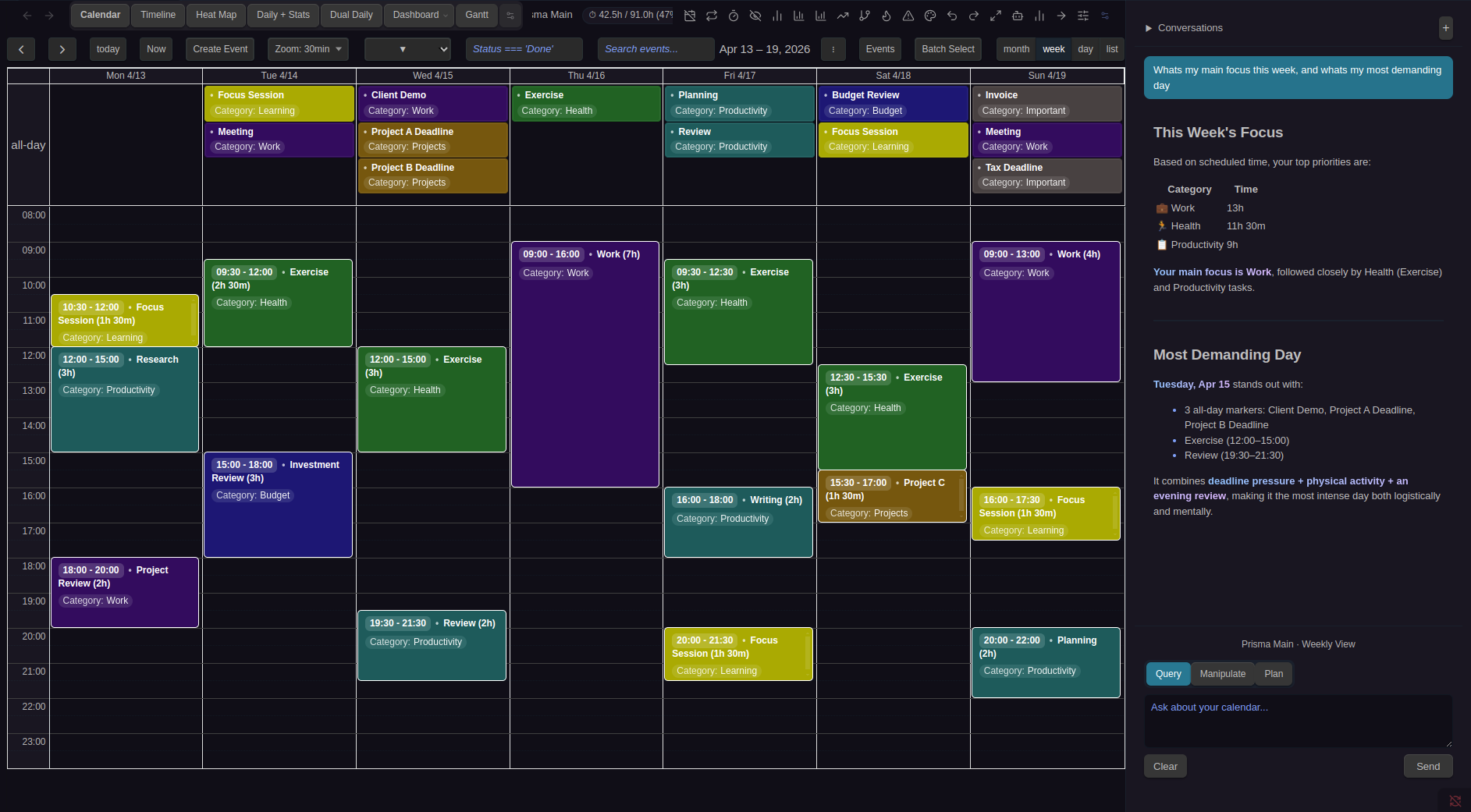
Built-in sidebar with Claude and GPT. Query, create, edit, and plan events via natural language. Programmatic AI API for scripting. Conversation persistence across sessions.
Dashboard
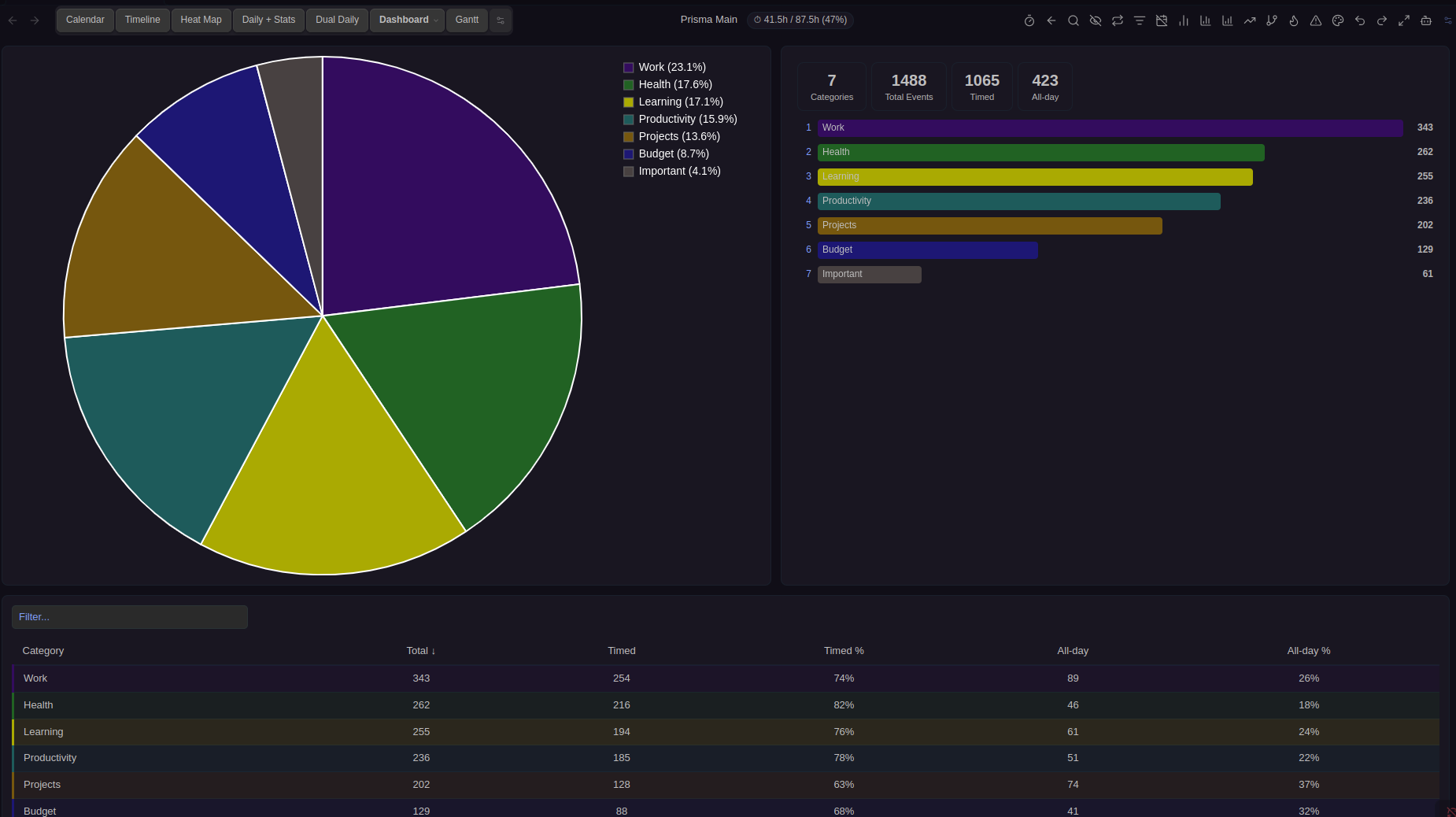
Full-page analytics with By Name, By Category, and Recurring subtabs. Pie charts, Top 10 bar charts, summary stats, and sortable paginated tables in a resizable 2x2 grid.
Gantt View
Horizontal event bars on a date timeline with native dependency arrows between prerequisite pairs. Day/Week/Month/Year modes.
Heatmap View
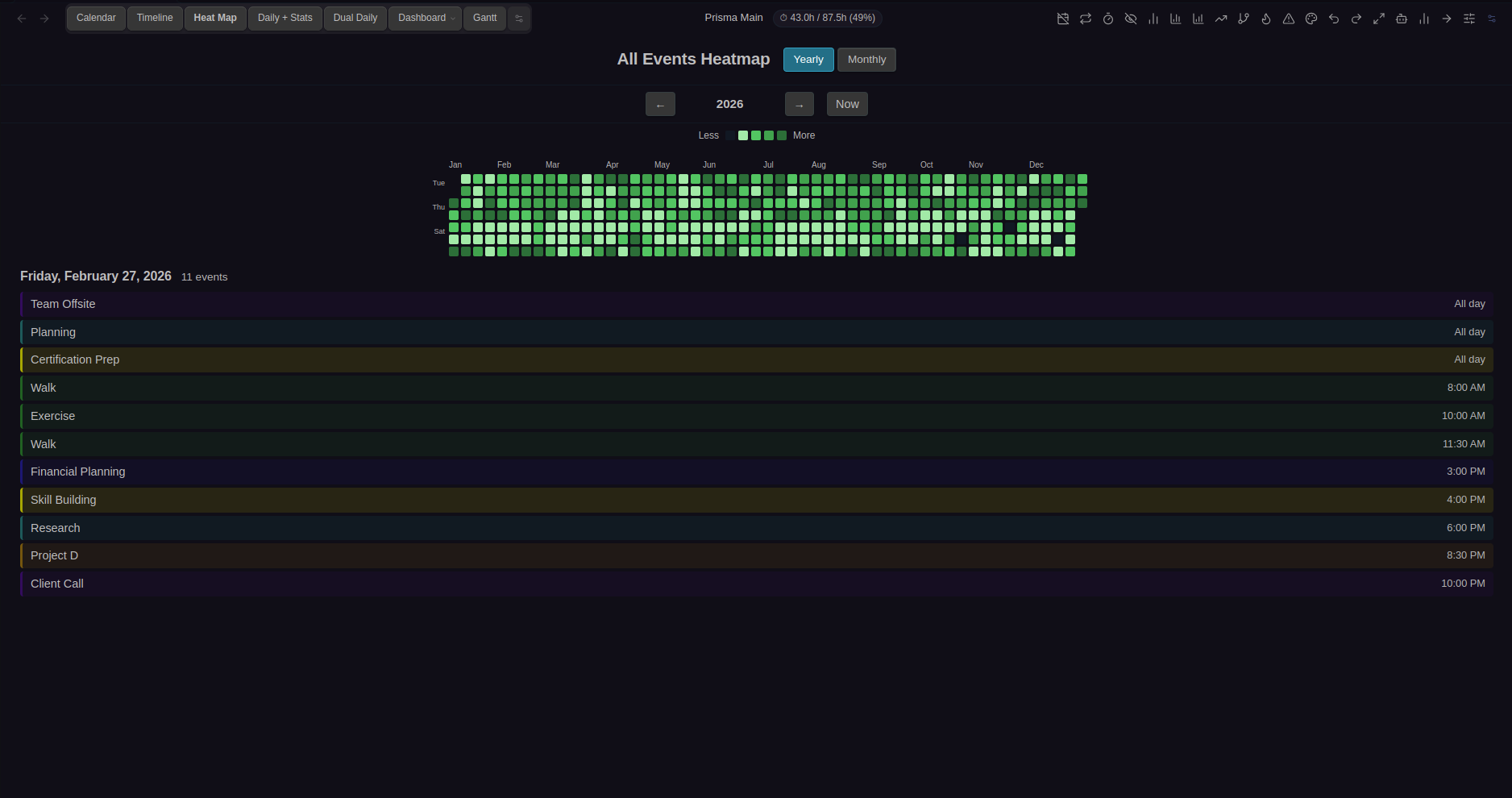
GitHub-style contribution heatmap showing event density over time. Yearly and monthly modes, category-colored gradients, click-to-inspect day details, and hover tooltips.
Bases Calendar View
Render Prisma Calendar events inside Obsidian Bases view as a fully interactive calendar. Drag-and-drop, context menus, batch selection — all inside Bases.
Prerequisite Connections
SVG arrow overlay showing directed dependency arrows between prerequisite events. Dashed stubs for off-screen events. Pairs with the Gantt view for full project planning.
CalDAV & ICS Sync
Sync with Google Calendar, Apple Calendar, Outlook, Fastmail, Nextcloud, iCloud, and any CalDAV/ICS service. Imported events become normal Obsidian notes you fully own. ICS URL subscriptions + import/export with RRULE preservation.
Programmatic API
window.PrismaCalendar and URL scheme for full CRUD, batch ops, statistics, settings, navigation, and AI queries from external scripts.
Unlimited Calendars & Presets
Remove the 3-calendar and 2-preset limits. Create as many calendars and event presets as your workflow needs.
Auto-Assign Category Presets
Map comma-separated event names to categories. Events auto-match on creation. Substring matching also available for flexible auto-assignment.
Priority Support
First in line for help and feature requests. Direct, priority assistance from the developer.
Free vs Pro
Prisma follows a freemium model — every core feature is completely free. No account, no trial, no limitations on the core experience. Just install and go.
For more connected, advanced workflows, Prisma Pro unlocks external calendar sync, advanced visualizations, Bases integration for embedding views directly inside your notes, the scripting API, and other power-user capabilities built for serious planning inside Obsidian.
Free
Forever · No account needed
- Up to 3 calendars, 2 event presets
- 4 tabbed views: Calendar, Timeline, Daily + Stats, Dual Daily
- Full recurring events (9 types + custom)
- 50-action undo/redo history
- Batch operations (10+ bulk actions)
- Time tracker, statistics & capacity tracking
- Header actions, color rules, filters, notifications
- Prerequisites, ICS import/export, 30+ hotkeys
- Holidays (50+ countries), mobile support
- Title autocomplete, ZettelID, Templater
Pro
From $3/mo
Everything in Free, plus the power tools:
- Dashboard — pie charts, tables, Top 10 rankings
- AI Chat — Claude & GPT, query/edit/plan + API
- Gantt View — timeline bars with dependency arrows
- Heatmap View — GitHub-style density visualization
- Bases Calendar — interactive calendar inside Obsidian Bases
- Prerequisite Arrows — SVG dependency overlay
- CalDAV & ICS sync with Google, Apple, Outlook, iCloud
- Programmatic API & URL scheme + AI API
- Unlimited calendars & event presets
- Priority support
Prisma Calendar Pro
Then $3/mo (billed yearly) after 30-day free trial · Cancel anytime
- Everything in Free, plus:
- Dashboard — pie charts, tables, Top 10 rankings
- AI Chat — Claude & GPT (query, edit, plan) + AI API
- Gantt View with dependency arrows
- Heatmap View — GitHub-style density visualization
- Bases Calendar View — interactive calendar inside Bases
- Prerequisite connection arrows (SVG overlay)
- CalDAV & ICS sync + import/export
- Programmatic API & URL scheme
- Unlimited calendars & event presets
- Priority customer support
No credit card charged for 30 days
Why Pro?
"Why should I pay for an Obsidian plugin?" Fair question — here's the honest answer.
Prisma is fully free and feature-rich out of the box. You can use it forever without paying a cent. Pro is for people who want to go deeper — external calendar sync, Gantt charts, heatmaps, AI, the scripting API, and more.
But there's a bigger reason Pro matters. There's a familiar pattern in the Obsidian ecosystem: a developer builds a great plugin, it gets popular, then slowly goes quiet. Life gets busy, updates slow down, bugs pile up. It happens because maintaining a complex plugin takes serious, ongoing time — and most developers can't justify 20+ hours a week on something that doesn't pay the bills.
Pro breaks that cycle. Every Pro license directly funds full-time development of Prisma. It means I can prioritize this work, ship improvements consistently, fix bugs fast, and build the features you ask for.
This isn't a side project — it's my work. Pro is what keeps it sustainable, for me and for everyone who uses Prisma, free or paid. If you rely on Prisma, Pro is what ensures it keeps improving, consistently and long-term.
Note: I regularly publish update videos, and every change is documented in the changelog. Prisma is under active, full-time development.
Common concerns, honest answers
"It looks too complex. I don't know if it's for me."
Watch the quick start video. You can start using Prisma Calendar in under two minutes — literally. Install it from the Obsidian Community Plugin Store , configure one date property, and you're creating events. Done.
Prisma has many features, but you don't have to use all of them. They're there so you have options. Take it one step at a time. Most people use 20% of features on day one and gradually explore the rest as their system grows. You don't have to eat the entire cake.
"I don't want to learn a new system."
You don't have to learn anything. Prisma works like any calendar you've used before — click a day, type a name, done. The difference is that everything is stored as plain Markdown notes in your vault. All the automation and power features come free out of the box, but they don't get in your way until you want them.
"I don't want to change my existing note structure."
Prisma adapts to you, not the other way around. You tell Prisma which frontmatter properties to read. It works with whatever you already have — date, due, scheduled, start, whatever you call it. No migration. No restructuring. Your vault stays yours.
"What if this plugin gets abandoned?"
This is my work. I've been building Prisma for over a year with serious infrastructure behind it — comprehensive testing, detailed documentation, multiple video tutorials, regular release cycles, and active GitHub issue support.
I genuinely enjoy improving this plugin. I respond to issues, ship changelog videos with every update, and maintain an encyclopedia covering every feature. Pro supporters directly fund this continued development — which is exactly why active maintenance is sustainable long-term.
"Is my data safe?"
Your data never leaves your machine. Prisma is local-first. Everything is stored as plain files in your Obsidian vault. The only network call is a periodic license check for Pro users, and Prisma keeps working offline for up to 7 days between checks. No telemetry, no cloud sync, no data collection. The plugin source code is open on GitHub.
Frequently Asked Questions
Is Prisma Calendar free to use?
How does the 30-day free trial work?
Can I cancel anytime?
Why is the yearly plan cheaper?
Do I need an internet connection?
What happens to my data?
What support do Pro users get?
Prisma Calendar — Disclosure
- • Prisma Calendar is developed by Matej Vavro and is not affiliated with Obsidian.
- • An account and payment are required for Pro access. A 30-day free trial is available.
- • Prisma Calendar works offline for up to 7 days at a time; an internet connection is needed periodically so the license can re-verify and stay valid.
- • Prisma Calendar does not access, collect, or transmit your vault data. All notes remain local.
- • The plugin source code is available on GitHub. Backend license verification is proprietary.
- • Google Calendar, iCloud, Nextcloud, Outlook, and Fastmail are trademarks of their respective owners. Prisma Calendar integrates with these services through the open CalDAV and ICS standards and is not affiliated with, sponsored by, or endorsed by them.